
e-Recepce — Self-Service Reception
A reception that checks visitors in at six in the morning and on a Sunday. The visitor identifies themselves with an ID document or a QR code, goes through the safety briefing, the system calls the host and issues an access card.

Eight minutes at the desk shrinks to ninety seconds
A conventional reception has two weaknesses: it costs a wage for every hour of operation, and outside working hours it simply isn’t there. Yet most of what a receptionist does is repetitive admin — copy down a name, collect a signature on the briefing, call the host, issue a card and take it back after the visit.
e-Recepce runs this whole chain itself. The visitor presents an ID card or scans the QR code from the invitation, the system reads the details from the document, walks them through the safety briefing, has them sign directly on the screen, calls the host and, once confirmed, issues an RFID card for the turnstile.
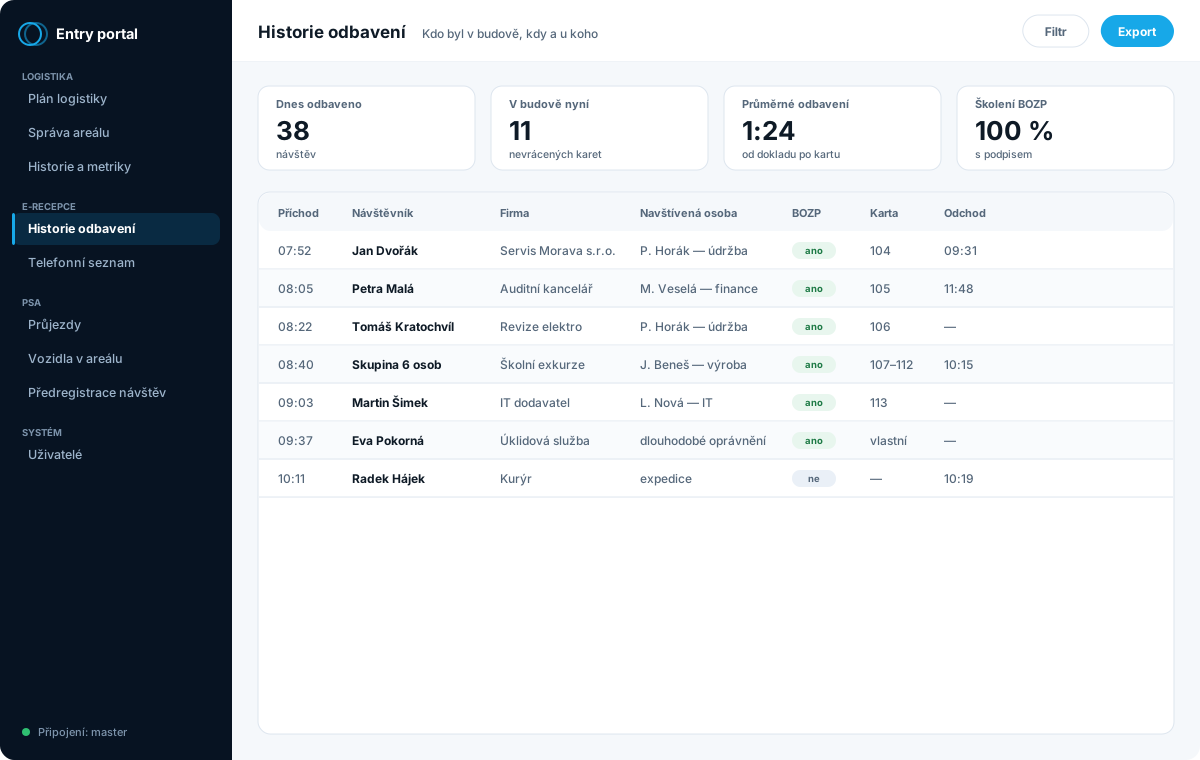
You get a record in which it can be traced who was in the building, when they arrived, whom they visited and that they completed the briefing. That’s exactly what an auditor and your insurer will ask for.
Here too there are more names than things. Automated reception, self-service reception and digital reception all mean the same — a visitor kioskthat handles registration without a receptionist. If you need a visitor log without a kiosk, staffed at the gatehouse, a better fit is the visitor management system.
What goes away
- A wage for a staffed reception outside peak hours
- A hand-kept visitor book
- Paper safety-briefing records
- Tracking down who lost a card
- A queue when a whole group arrives at once
What e-Recepce can do
The scope is assembled to fit your operation — from bare registration all the way to full integration with your access control system.
- Round-the-clock 24/7 operation without staff
- Reading ID cards and passports
- Reading QR codes from invitations
- Multilingual interface
- Digital safety briefing and PPE
- Electronic signature on the screen
- PDF record of the completed briefing
- Automatic RFID card issuance
- Card collection on exit (swallower)
- Bulk registration of a whole group
- Web pre-registration of visitors
- iCalendar invitations for Outlook
- Contacting the host by phone
- Entry authorisation via touch-tone
- Visitor records and history
- Data export for audit
- Connection to the access control system via API
- Web-based administration from any computer
Records you’ll see the day after go-live
Administration runs in the browser. The most common print-out is an overview of who was in the building — whether for an audit or when tracking down a missing card.
Typical deployments
It makes the most sense where dozens of people pass through reception each day, where operations run outside normal working hours, or where you must demonstrably document the safety briefing.
e-Recepce documents
What we usually send by email after the first call. You can take it straight away.
The kiosk doesn’t read the document by eye, but from the machine zone
A cheap solution scans the front of the document and “reads” it by OCR — and mistakes a zero for the letter O. Our kiosk reads the machine-readable zone (MRZ) to the ICAO 9303 standard: on an ID card, a passport and foreigners’ documents alike. The zone includes check digits, so the transcription verifies itself and the visitor form is pre-filled without typos.
Two optional extras go with that. A validity check of the document against the public register of invalid documents can be added so that it runs from a local copy even during a network outage — the kiosk warns when a presented document is reported lost or stolen. And detection of the presence of alcohol in the breath using an external tester.
Where the limit lies, we say straight out: the kiosk verifies that the document isn’t reported as invalid and that the check digits match. It does not verify the physical authenticity of the document, nor that the person is its holder — that is a different level and we never sell it as “identity verification”.
We are just as straight about the tester: we detect the presence of alcohol in the breath, we do not measure its level and we are not a certified measuring instrument. The result is an instruction for processing, not evidence.
What the kiosk can do from a document
- MRZ reading — ID card, passport and foreigners’ documents
- Verifying check digits against typos
- Optional validity check against the register
- Optional detection of alcohol in the breath
- Pre-filling the visitor form without manual typing
What people ask most often
Do we have to lay off the receptionist for this?
No, and most customers don’t. The typical scenario is that the receptionist stays for what a machine can’t do — representation, handling exceptions, work for the company — while the kiosk covers the morning peak, lunchtimes, evenings and weekends. The saving comes from not having to staff the second and third shifts.
Where does the software run — with us or with you?
According to your IT policy. The control software can run directly in the kiosk, on a server in your network, or in our dedicated infrastructure. In the basic deployment the database is local and not exposed to the internet.
Who supplies the content of the safety briefing?
You do. We supply the technology that presents it, collects the signature and stores the record. The content of the briefing is your responsibility and tends to differ for each operation.
Can it issue a card into our existing access control system?
Sometimes yes, but it’s not a given — it depends on what interface your system offers. Either the kiosk issues cards with rights preset directly within it (typically to the adjacent turnstile), or the rights are managed in your access control system via its API. We always verify the second option in advance and never promise it blind.
Can it handle a group arriving on a single bus?
Yes. Bulk registration records the whole group at once; the driver gets a virtual card and the crew physical cards for the turnstile.
What is the difference between an electronic, an automated and a self-service reception?
They are labels for the same thing — a reception the visitor operates themselves at a kiosk. The decision should rest on something else: whether you want a kiosk that handles the whole visit (document, briefing, call to the host, card), or only a visitor log kept by staff at the gatehouse. The latter is what the visitor management system does.
Which identity documents can the kiosk read?
The document reader handles identity cards and passports; from an invitation a QR code is enough. Reading documents is optional — in some places it is enough for the visitor to give a name and company. You set what is actually stored from the document; the system does not need to record more than you have a legal basis for.
Interested in e-Recepce for your operation?
Describe how things work at your site today. We'll come back with a proposed scope and a price — or start by building your specification in the configurator.