
A head start on faults
Service starts the moment a fault occurs — not once it is reported.
A health check for your systems that never sleeps. We check every gatehouse and reception device every minute — and react to a fault before the morning queue meets a breakdown at your gate.

The gatehouse or reception is the technology your site entrance depends on. When the licence-plate camera stops reading on Sunday night or the barrier jams, you usually find out in the morning — from the queue at the gate. Standard service is reactive: you notice, you call, a technician responds. Between the fault occurring and being reported, hours pass — sometimes days.
Even sneakier are silent faults: the server responds, ping goes through, and yet the gatehouse does not work properly — an induction loop stuck on occupied, a barrier relay that stays closed, a gate sensor reporting contradictory states. Neither ping nor standard IT monitoring sees this, because it watches computers, not the technology.
REMOTE CARE se proto dívá i tam, kam ping nedosáhne: na signály řídicího systému — všude, kde je systém publikuje po síti; u starších instalací určí rozsah dohledu vstupní inventura. A protože dohled i servis držíme my, ze zjištění je rovnou zásah — ne jen další alarm v něčí schránce.
Monitoring runs on the server you already have. No new hardware, no changes to your network.
The monitoring service runs on the installation's existing server. It communicates encrypted and outbound only — no ports to open.
Every device according to its type: server, kiosk with peripherals, cameras, control units. A report missing for 90 seconds means an incident.
Defined faults the agent handles itself, up an escalation ladder: restart the application, the service, the computer. Only then does it wake people.
A brief connection flicker wakes nobody. Only a persisting incident triggers an SMS alert.
Monitoring runs continuously and automatically; a technician intervenes remotely within the business hours and response times of the agreed SLA level. Every step leaves an audit trail — who did what and when.
The scope is composed per installation — from the server and kiosk down to individual gatehouse signals.
The central monitoring dashboard: status of sites, devices and gatehouse components, incidents and availability history.
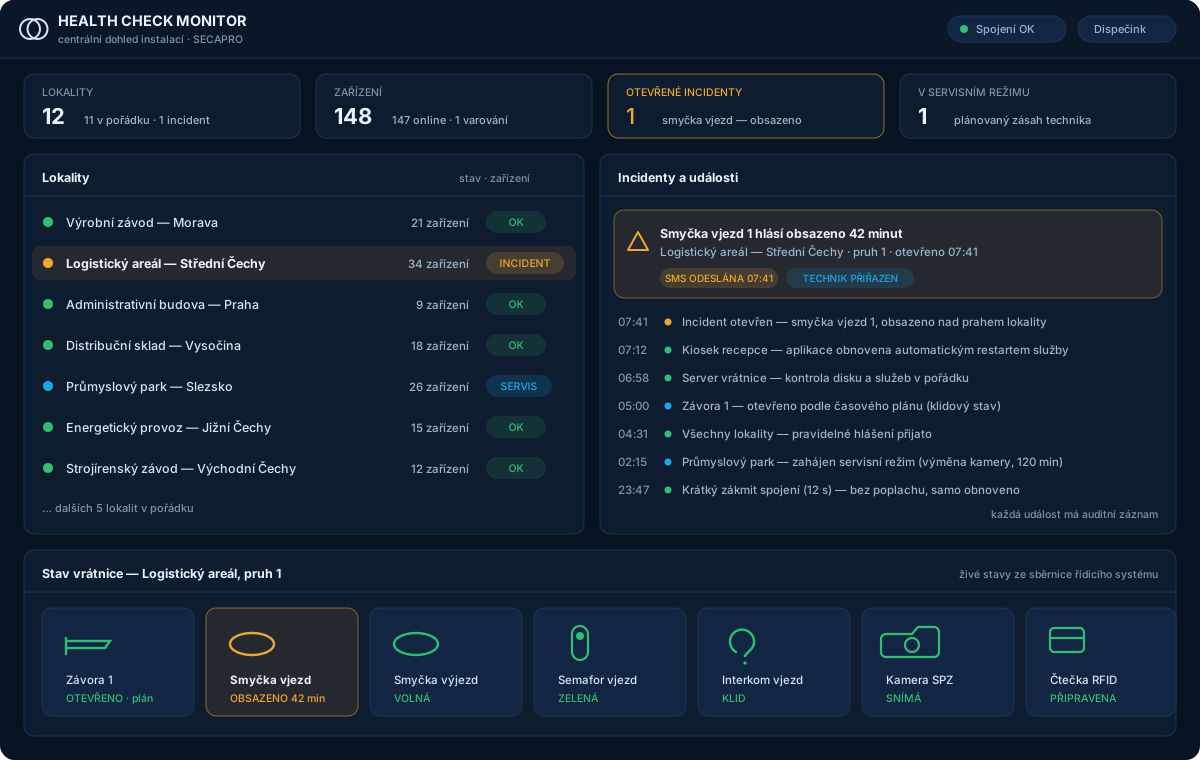

Service starts the moment a fault occurs — not once it is reported.
A large share of interventions happens remotely, by restart — no travel, no waiting.
Availability and incident history for every device. Data, not impressions.
No new hardware, no inbound ports — just an encrypted outbound connection.
No. The monitoring agent runs as a service on the server that is already part of your installation. It communicates outbound only over an encrypted connection, so you need no public IP address, no open ports and no firewall changes.
Právě na to je dohled stavěný. Agent se centrále hlásí průběžně; když se lokalita odmlčí na víc než 90 sekund, vzniká incident a je hned vidět, že problém je v konektivitě — dřív, než to poznáte podle nefungujících služeb.
Ne. Technik si při zásahu umí vyžádat aktuální náhled z kamery u závory, aby viděl skutečnou situaci na místě — jestli v pruhu stojí vozidlo a v jaké poloze je rameno. Nejde o kamerový záznam ani o napojení na váš kamerový systém.
No, it extends it. Response times, preventive maintenance and service scope are still set by the SLA service contract — REMOTE CARE is its paid add-on: monitoring adds data and a head start, we know about a fault immediately and often fix it remotely before a ticket would even exist.
As a paid add-on to your SLA service contract — it can be added to a new or a running contract. You will get the price for your scope in a quote; build your specification in the configurator, or get in touch.
Alarm thresholds are not copied from a table — they are calibrated from the real traffic of your site, so an alarm means a fault. Brief connection blips are not reported at all, and during on-site service work the site switches into maintenance mode.
Tell us how things work at your site today. We'll come back with a proposed scope and a price. If you'd like to see the system first, we'll arrange a demo.