
Visitor management system
Not every operation needs a self-service kiosk. When someone is already staffing the gatehouse, all they need is a tool that keeps the records and tracks briefings for them.

A kiosk doesn't pay off everywhere
A kiosk makes sense where there are queues, where the site runs outside working hours, or where a staffed shift is to be saved. But when someone is sitting at the gatehouse anyway and only a few dozen people pass through each day, investing in a kiosk is needlessly large.
The visitor management system solves the same thing for less: the operator logs the arriving person through the browser. They hold the ID document to the reader, the system pulls the name and number from it, finds the person from a previous visit, and immediately checks whether their safety briefing is still valid.
It runs on its own. It needs no site traffic system and no link to our portal — it can be deployed even where you don't have any other technology of ours.
In practice this is an electronic visitor log: it replaces the notebook on the counter with searchable records that track validity on their own. Besides visitors it also holds records of suppliers and external workers, and an overview of the people currently on site. The difference from the electronic reception is just one: here the staff enter the data, there the visitor enters it themselves at the kiosk.
When to choose the system over a kiosk
- The gatehouse has staff who will stay there
- Daily arrivals number in the dozens, not hundreds
- The budget won't cover a kiosk, but records are still needed
- You want to start with records and address a kiosk later
- You mainly need documented safety briefings, not self-service
From ID document to record
The whole check-in is a single screen. The operator doesn't switch between windows.
Presenting the ID document
The reader reads an ID card or passport and fills in the surname, given name, and document number. It can be presented at any point while filling in the form — the cursor need not be in any field and text already typed is not disturbed. An expired document is flagged by the system.
Finding the person
By document number the person is matched to an earlier visit, so no duplicates arise. A second arrival of the same person without a recorded departure is rejected by the system.
Entry type
Visitor, short-term or long-term supplier. The matrix uses this to determine which briefings are mandatory.
Briefing check
If you also have the Safety Briefing module, the system verifies validity right away. If something is missing or has expired, a dialog with options pops up for the operator. Without this module, the step is skipped.
Recording the arrival
The company, who they're visiting, the purpose, the issued card number, and optionally the licence plate are added. The person then appears in the “On site” overview.
What the system can do
- Logging of both people and vehicles at the gatehouse
- Three entry types, each with its own rules
- Reading ID cards and passports
- Document validity check
- Finding a person by document number
- Rejection of a double arrival
- Company field with autocomplete from records
- Visitor card tracking
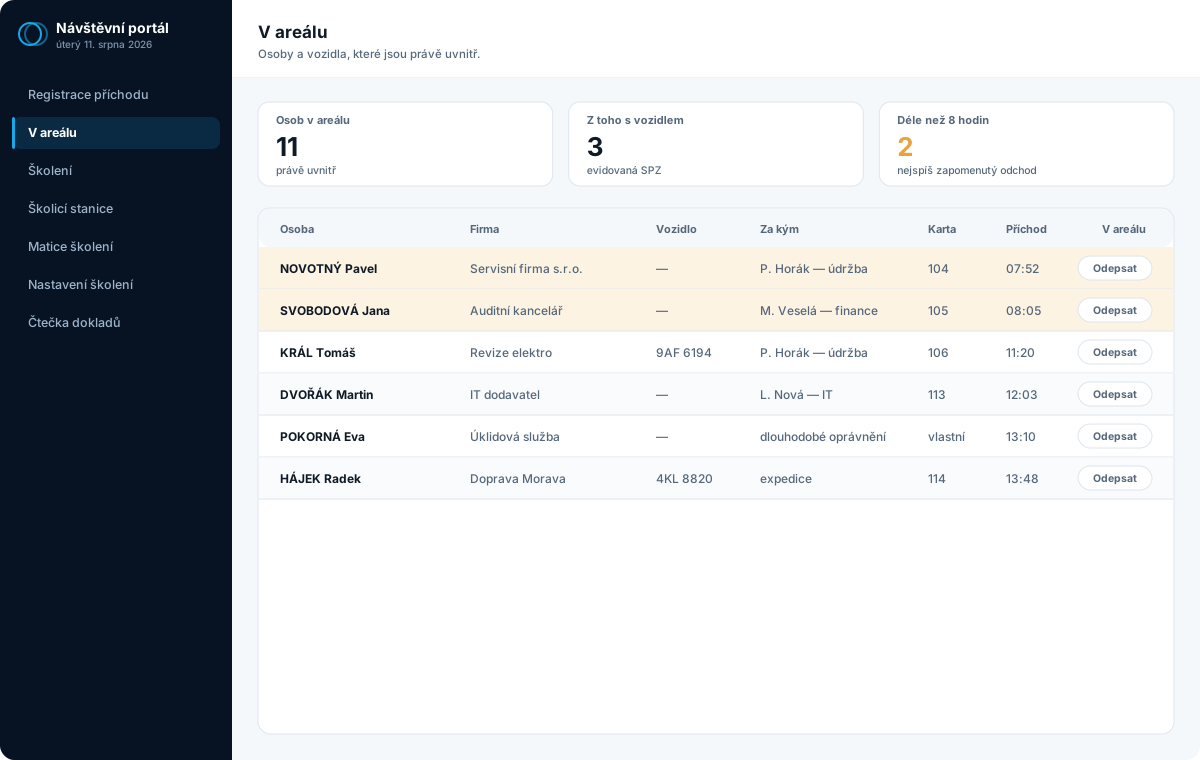
- “Who's on site right now” overview
- Highlighting of stays over 8 hours
- Runs on a PC, laptop, tablet, or phone
- Departure logging and length of stay
- Optional link to the Safety Briefing module
The Safety Briefing module can be added — or left aside
The visitor management system logs who is on site. The Safety Briefing module makes sure that person has completed a briefing and that it's still valid — and it applies to everyone entering, including your own employees.
They work separately and together. When you combine them, briefing validity is checked right at registration and the operator sees what a person is missing before letting them in. If you'd rather not deal with it now, the visitor management system runs without it too.
The reverse is also true: many customers are pushed by an audit precisely toward documented briefings, and they acquire the module before the visitor records.
What combining them brings
- Validity check at every arrival
- Matrix of obligations by entry type
- Sending to the training PC straight from registration
- Signing on a tablet right at reception
- Confirmation traceable to the person
In the browser — on a PC, laptop, tablet, or phone
It's not a program you install. At the gatehouse you open an address and start working. The same address works from a PC, laptop, tablet, or phone, and the interface adapts to the screen size.
In practice it's usually split like this: a PC or laptop at the gatehouse, because the readers connect to it, a tablet for signing, and a phone for a quick look at who's on site — for instance when the shift supervisor walks the floor.
One limitation is worth stating: USB hardware — the ID document reader, the card reader, and the signature pad with its own display — needs a computer. From a phone you can log entries manually, but a document can't be read from it.
Signing works with a finger, a pen, or a mouse. Pads with their own display — Wacom STU and signotec — are handled by a small program on that computer; more detail under the Safety Briefing module.
Where it's used
- A PC at the gatehouse — with the readers
- A laptop at reception or in the office
- A tablet for the visitor's signature
- A phone for an overview of who's on site
- A training PC in full-screen mode
Two screens the operator uses all day
It runs in the browser on the gatehouse PC. Nothing is installed.

What people ask most often
How does it differ from e-Recepce?
The kiosk handles the visitor on its own — the visitor identifies themselves, completes the briefing, and picks up a card with no staff involved. The visitor management system is a tool for the operator: it logs the same thing, but a person at the gatehouse enters it. A cheaper entry level where self-service isn't the goal.
Do we have to take the Safety Briefing module too?
No. The Safety Briefing module is sold separately — you can get it on its own, later, or not at all. Without it, the visitor management system logs arrivals and departures as usual; it just doesn't track briefing validity.
Can we start with this and add a kiosk later?
Yes, and it's a sensible approach. First you get the records in order, and only then do you consider whether investing in self-service makes sense.
What device will it run on?
On anything with a browser — PC, laptop, tablet, or phone; the interface adapts to the screen. A computer is only needed where USB hardware hangs off it: the ID document reader, the card reader, or the signature pad with its own display.
Does it need a link to your portal or the site traffic system?
No. It runs independently. That's by design — it should be deployable even where you have nothing else from us.
What's needed on the IT side?
A server with a database on the customer's network and a browser at the gatehouse. The ID document reader connects by USB cable and requires no driver.
Interested in a visitor management system for your operation?
Describe how things work at your site today. We'll come back with a proposed scope and a price — or start by building your specification in the configurator.