Skip to content
Site control

Logistics and Yard Management

Trucks no longer queue at the gate because nobody knows which dock is free. The Logistics module schedules time windows, manages the parking queue and measures how long a vehicle actually spent at the dock.

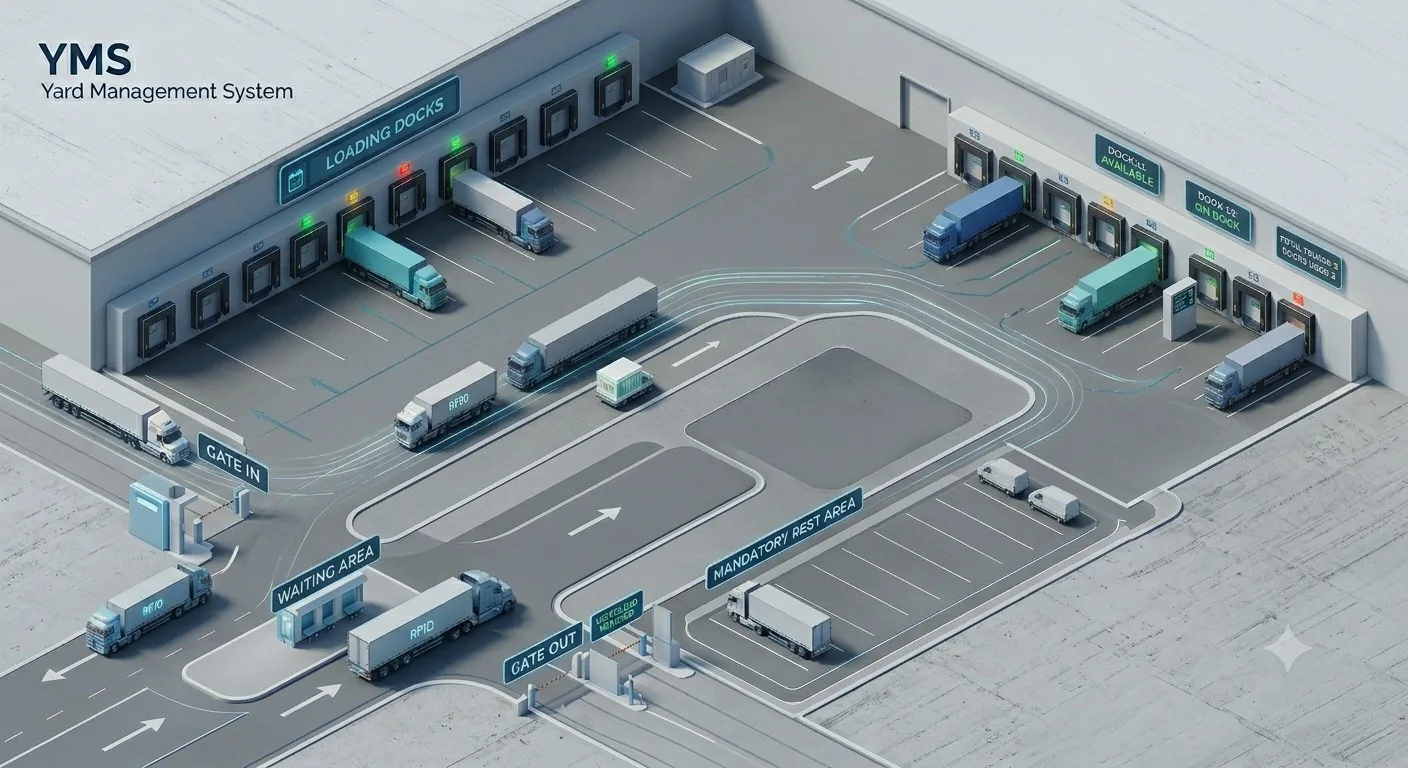
Diagram of a logistics site with loading docks, a vehicle queue and a holding area
Software · monthly licence · developed and engineered in-house
Why it matters

Delays at the dock are a cost nobody measures

In most sites, delivery scheduling happens in Excel and over the phone. A carrier calls, someone tells them “come in the morning,” then in the morning five trucks arrive at once and four of them sit in the car park for two hours. Nobody knows exactly how long, because it isn’t recorded anywhere.

The Logistics module moves this process into a system. The carrier requests a slot themselves via a public form, the logistics operator approves it by dragging it onto a dock, the system sends the driver an SMS and, on arrival, automatically matches the vehicle to the plan by its licence plate.

Crucially, the status is not maintained by hand — it is projected from a sequence of events. Arrival, move to the dock, end of loading, release. From these the system calculates the waiting time, the loading duration and the total time on site by itself. A no-show is generated automatically; nobody has to record it.

The technical term for this is a Yard Management System (YMS); booking docks in time slots is known as dock scheduling. What matters is where the electronic gatehouse ends and the YMS begins: the gatehouse decides who may pass the gate. Yard Management deals with what happens to the vehicle inside the site — which dock it belongs to, how long it waits and when it leaves. Without that second step the queue simply moves behind the gate.

What you start to see

  • How long vehicles really wait in the car park
  • How much time they spend at the dock
  • Which docks are overbooked
  • Which carriers miss their slots
  • The gap between plan and reality
One truck’s journey

From booking a slot to leaving the site

Seven steps that today usually involve a phone call. The system handles them without a dispatcher and records the time at each one.

Booking a slot

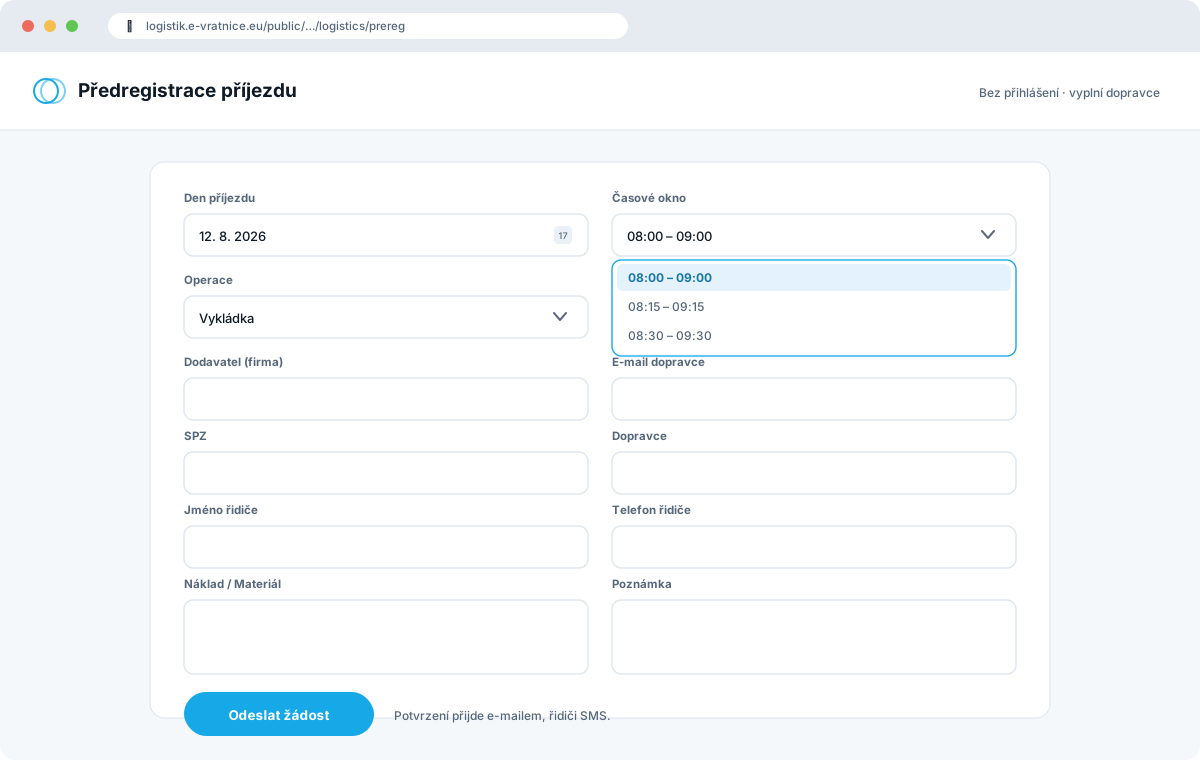
On a public page, the carrier picks a day and an hourly slot from the available times. No login, no phone call.

Approval

The logistics operator confirms the request by dragging it onto a dock. The system sends confirmation by email and SMS to the driver.

Arrival at the gate

A camera reads the licence plate and the system matches the vehicle to the scheduled delivery on its own.

Check-in

A driver without a booking registers at the kiosk and completes the safety briefing. The rest drive straight on.

Queue

The vehicle waits in the parking area. The system measures the waiting time and keeps the order.

Call to the dock

The LED panel shows the plate and the dock number, and the driver gets an SMS at the same time. No calls to a dispatcher.

Departure and record

End of loading, release and a record in the history — waiting, time at the dock and time on site.

Module components

Four screens that cover the whole day

Logistics plan

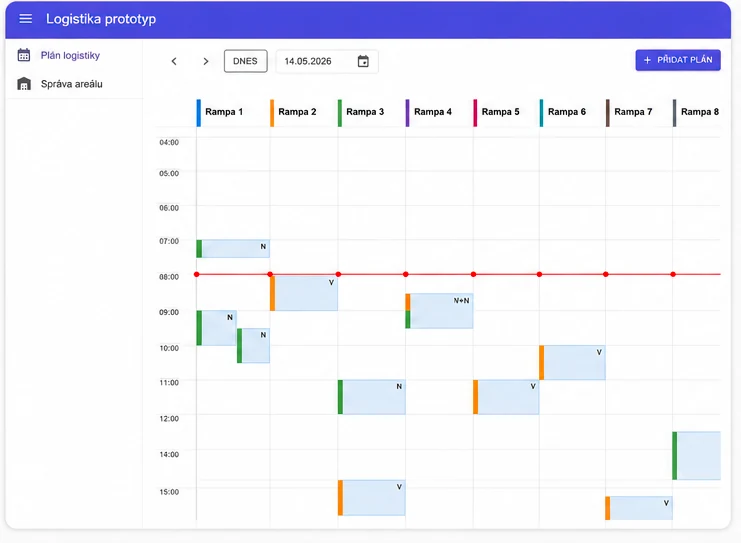
A daily calendar; columns are docks, slots run in 15-minute steps across a full 24 hours. Plan cards are colour-coded by operation and status, with a “now” line, filters and full-text search. Rescheduling is done by dragging to another time or another dock.

Site management

The parking queue alongside dock occupancy. The queue is ordered by arrival time and shows the waiting time; overbooking is visible at the docks too. A vehicle is sent to a dock by dragging, and returned the same way.

Carrier pre-registration

A public form with no login — the carrier picks a day and an hourly slot and enters the licence plate, driver and cargo. The logistics operator approves or rejects the request, and the system sends confirmation by email and SMS. Via a link, the carrier can correct the plate and phone number themselves.

History and metrics

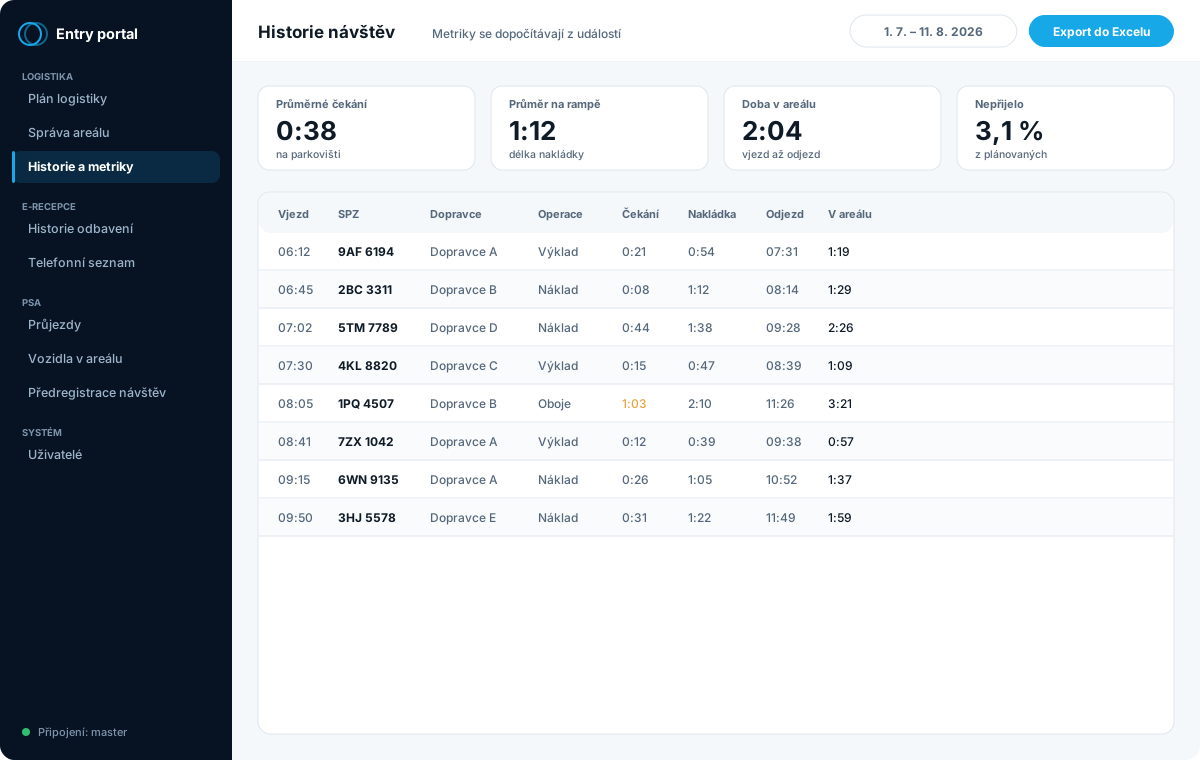
Arrival, plate, carrier, operation, waiting, loading duration, departure and time on site — with export to Excel. A direct answer to the tender requirement “entry history and data export”.

What it looks like

What the carrier sees and what the logistics operator sees

Everything runs in the browser — the carrier just needs a link, the logistics operator a computer or a tablet on the floor. Nothing is installed and nobody sets up accounts for carriers.

Public arrival pre-registration form with a day and time-window selection and carrier details
You can scroll the image sideways.
Arrival pre-registration — what the carrier sees. A public page with no login. The carrier picks a day and an hourly slot from the available times, enters the licence plate, driver and cargo, and submits the request. Nothing to install and no account to create.
Calendar of eight docks with hourly rows and colour-coded cards of scheduled deliveries
You can scroll the image sideways.
Logistics plan. Columns are docks, rows are hours, scheduling runs in quarter-hour steps. Cards are coloured by operation and rescheduling is done by dragging. A red line shows the current time.
Queue of waiting vehicles next to an occupancy overview of eight loading docks
You can scroll the image sideways.
Site management. On the left, the queue of waiting vehicles with cargo, driver, licence plate and waiting time — from here you send them to a dock or send an SMS. On the right, dock occupancy: what is standing at each and what is free.
Table of visit history with calculated metrics and export to Excel
You can scroll the image sideways.
History and metrics. Waiting, loading duration and time on site are derived from events, not from manual entries. Export to Excel covers the tender requirement “entry history and data export”.
Logistics planning and site management are screenshots from the development environment, pre-registration and history schematic previews. It's all sample data — actual screens carry licence plates, carriers and the names of our customers' drivers. We'll gladly show you the live environment during a guided demo — projdeme přitom váš scénář závozu.
Capabilities

What the module can do

  • Dock calendar in 15-minute slots
  • Rescheduling by drag and drop
  • Operations: loading / unloading / both
  • Automatic status calculation from events
  • Parking queue ordered by arrival time
  • Visible dock overbooking
  • Multiple car parks with switching
  • Automatic SMS when sent to a dock
  • Manual SMS to the driver
  • Public carrier pre-registration
  • Request approval workflow
  • Pairing code for the kiosk
  • Measurement of time at the dock
  • Comparison of plan and reality
  • History export to Excel
  • Kiosk and gate integration via an interface
What the module can't do yet — and we won't promise it: capacity limits on pre-registration based on team capacity, repeat bookings, notifications of vehicle rejection, and occupancy synchronisation with an external system. Dock capacity isn't enforced when sending — overbooking is allowed, it's just visible.
Integrations

An interface for the kiosk, the gate and your system

The module has a machine interface through which other elements talk to it. A kiosk or a gate reports a vehicle’s arrival and the system finds the matching plan by its licence plate on its own. The kiosk can request the details of the scheduled transport so it can show the driver straight away where to go.

The gatehouse has its own interface for physically entering and leaving the site. Access is protected by a service key with limited privileges.

Automatic SMS requires an SMS gateway. Without it the module runs normally, only the sending is skipped — the gateway can be added at any time later, and there is a separate item for it in the service contract.

Licensing

  • A monthly flat fee, not a one-off investment
  • Covers dock scheduling and site management
  • One-off commissioning of the module at deployment
  • You’ll get the licence price in the quote
Frequently asked questions

What people ask most often

How does truck tracking on site work?

From pre-registration to exit: the carrier requests a time window and the system records the arrival, the wait in the car park, the time at the dock and the departure. All from events, not manual entries — and with export to Excel.

Can carriers book a slot themselves?

Yes — through a public form with no login, they request an hourly slot. The logistics operator approves the request by dragging it into the dock calendar, and confirmation is sent to the driver automatically.

Can the system send SMS to drivers?

Yes — when a vehicle is sent to a dock, an SMS with the dock number goes out automatically, and you can send a manual message at any time. You just add a GSM gateway; without it the module runs and simply offers the sending.

Is the truck’s waiting time measured?

Yes: the wait before the dock, the loading time and the total time on site are calculated automatically from events. These figures are exactly the argument for why the investment pays off.

What is the difference between Yard Management and an electronic gatehouse?

The gatehouse decides who may pass the gate. Yard Management deals with what happens to the vehicle inside the site — which dock it belongs to, how long it waits, when it leaves. A gatehouse alone does not remove the queue, it only moves it behind the gate. Both can be deployed separately, but the greatest benefit comes from combining them: the plate read at the entrance matches the vehicle to its booking automatically.

How does queue control and truck processing on the parking area work?

A vehicle with no free dock stays on the holding area and the system keeps the order. Once a dock frees up, the driver gets an SMS and their plate appears on the LED panel together with the dock number. Nobody has to ring the dispatcher and the driver does not have to walk to the gatehouse to ask when their turn comes.

Interested in the Logistics and Yard Management module for your operation?

Describe how things work at your site today. We'll come back with a proposed scope and a price — or start by building your specification in the configurator.